Deprecated: MwpWorkerResponder::callback(): Implicitly marking parameter $response as nullable is deprecated, the explicit nullable type must be used instead in /var/www/stg-carey.globenetix.com/wp-content/plugins/worker/init.php on line 165

Deprecated: MWP_WordPress_Context::__construct(): Implicitly marking parameter $globals as nullable is deprecated, the explicit nullable type must be used instead in /var/www/stg-carey.globenetix.com/wp-content/plugins/worker/src/MWP/WordPress/Context.php on line 28

Deprecated: MWP_WordPress_Context::__construct(): Implicitly marking parameter $constants as nullable is deprecated, the explicit nullable type must be used instead in /var/www/stg-carey.globenetix.com/wp-content/plugins/worker/src/MWP/WordPress/Context.php on line 28

Deprecated: Symfony_EventDispatcher_EventDispatcher::dispatch(): Implicitly marking parameter $event as nullable is deprecated, the explicit nullable type must be used instead in /var/www/stg-carey.globenetix.com/wp-content/plugins/worker/src/Symfony/EventDispatcher/EventDispatcher.php on line 40

Deprecated: Symfony_EventDispatcher_EventDispatcherInterface::dispatch(): Implicitly marking parameter $event as nullable is deprecated, the explicit nullable type must be used instead in /var/www/stg-carey.globenetix.com/wp-content/plugins/worker/src/Symfony/EventDispatcher/EventDispatcherInterface.php on line 36

Deprecated: MWP_Extension_HitCounter::increment(): Implicitly marking parameter $dateTime as nullable is deprecated, the explicit nullable type must be used instead in /var/www/stg-carey.globenetix.com/wp-content/plugins/worker/src/MWP/Extension/HitCounter.php on line 37

Deprecated: relevanssi_is_front_page_id(): Implicitly marking parameter $post_id as nullable is deprecated, the explicit nullable type must be used instead in /var/www/stg-carey.globenetix.com/wp-content/plugins/relevanssi-premium/lib/common.php on line 1018

Deprecated: relevanssi_replace_stems_in_terms(): Implicitly marking parameter $all_terms as nullable is deprecated, the explicit nullable type must be used instead in /var/www/stg-carey.globenetix.com/wp-content/plugins/relevanssi-premium/lib/common.php on line 1843

Deprecated: Creation of dynamic property Smush\Core\Modules::$webp is deprecated in /var/www/stg-carey.globenetix.com/wp-content/plugins/wp-smush-pro/core/class-modules.php on line 109

Deprecated: Creation of dynamic property Smush\Core\Modules\Helpers\Parser::$iframes is deprecated in /var/www/stg-carey.globenetix.com/wp-content/plugins/wp-smush-pro/core/modules/helpers/class-parser.php on line 79

Deprecated: Puc_v4p10_UpdateChecker::fixSupportedWordpressVersion(): Implicitly marking parameter $update as nullable is deprecated, the explicit nullable type must be used instead in /var/www/stg-carey.globenetix.com/wp-content/themes/sc-blocks/vendor/plugin-update-checker/Puc/v4p10/UpdateChecker.php on line 360

Deprecated: Puc_v4p10_StateStore::setUpdate(): Implicitly marking parameter $update as nullable is deprecated, the explicit nullable type must be used instead in /var/www/stg-carey.globenetix.com/wp-content/themes/sc-blocks/vendor/plugin-update-checker/Puc/v4p10/StateStore.php on line 79
Expense Management – SAP Concur Partner | Carey Executive Transportation
Skip to Content

Want to book faster? Sign In

Expense Management – SAP Concur Partner


Warning: Undefined variable $sub_title in /var/www/stg-carey.globenetix.com/wp-content/themes/sc-carey/functions.php on line 875

Expense Management – SAP Concur Partner

Carey International customers who use SAP® Concur® solutions for expense management can now have their Carey receipts automatically transferred to their Concur Expense Management tool by connecting their Carey profile to their Concur Expense account. The process is quite simple and can be done from either the Carey website or mobile app. Once connected, you can start receiving receipts to your Concur Expense account immediately.

Connect Via The Website

  1. Log into your existing account or set up a new account if you are a first-time user
  2. Select [My Profile] then choose [Expense Management]
  3. Click on the ‘Link to Concur’ option
  4. Enter your Concur Expense ID (email address) and password
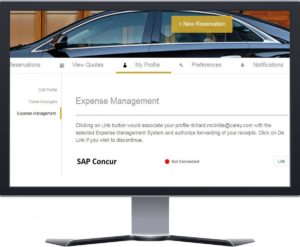
computer monitor displaying the Carey website

Connect Via The Carey Mobile App

  1. Download the Carey mobile app IOS/Android
  2. Log into your existing account or set up a new account if you are a first-time user
  3. Navigate to [My Profile] then choose [Expense Management]
  4. Tap the ‘Link Concur’ option
  5. Enter your Concur Expense ID (email address) and password
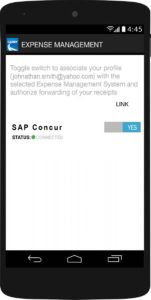
mobile device displaying the SAP Concur setting on the Carey mobile app

**Please note in order to assure that connection works properly, you must provide Carey with the same e-mail address that you have registered on your Concur Expense account.